Windows TPM Attestation
Windows TPM Attestation allows KACE Cloud to verify the boot integrity and security configuration of enrolled Windows devices. There are two attestation technologies used depending on the Windows version:
Windows 11 devices use Azure Attestation, where KACE Cloud sends MDM commands that instruct the device to validate its Trusted Platform Module (TPM) security information with an Azure Attestation Provider hosted in the KACE Cloud environment.
Windows 10 devices use Device Health Attestation (DHA), Microsoft's older attestation service and the device connects to the Microsoft DHA cloud service to validate the TPM.
For Windows 11 devices using Azure Attestation:
- TPM 2.0 (version 1.2 may work)
- UEFI firmware
- Windows 11 version 21H2 (10.0.22000) or later
- Virtual machines are supported.
For Windows 10 devices using Device Health Attestation:
- TPM 1.2 (version 2.0 would be better)
- UEFI firmware
- Windows 10 version 1511 (10.0.10586) or later
- Physical devices only. Virtual machines are not supported by DHA.
- Compatible UEFI certificates in the BIOS and up to date chipset drivers
If a device cannot run attestation due to incompatible hardware, KACE Cloud does not constantly send the attestation commands. KACE Cloud will attempt attestation up to five times. If all attempts fail, the device is marked as Not Verifiable. An administrator can reset the failure count using the Reset button in the device detail settings. Once the failure count is reset to zero, the next inventory run will attempt to request attestation again.
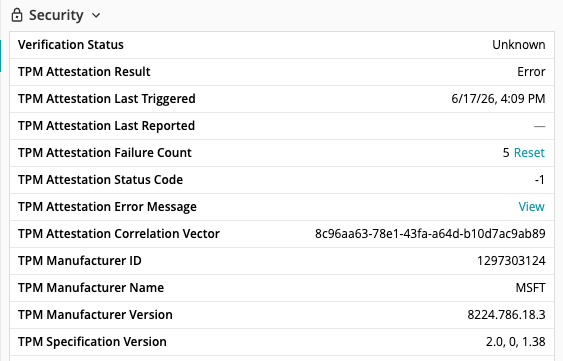
Attestation results appear in the device security card, consistent with other device types.
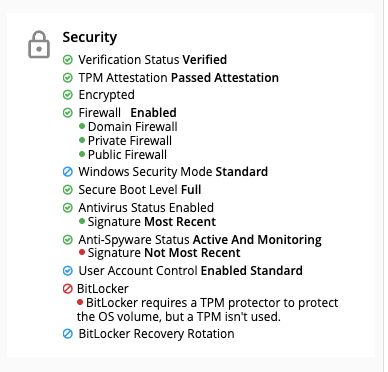
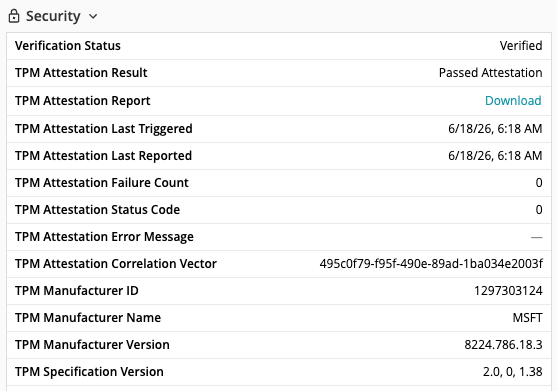
The device details section shows the individual attestation properties reported by the device and there is an option to download the attestation report.
Windows 11 attestation properties
The following properties are evaluated by the Azure Attestation Provider for Windows 11 devices. The values checked appear in the x-ms-policy section of the attestation JSON.
| Property | Description |
|---|---|
| secureBootEnabled | Secure Boot ensures that only trusted software, signed by manufacturers or Microsoft, loads during startup. It protects against rootkits and low-level malware that attempt to infect the computer before the operating system boots. |
| codeIntegrityEnabled | When code integrity is enabled, code execution is restricted to integrity-verified code. This validates that system files and kernel-mode drivers are properly signed and unmodified before loading into memory. |
| bitlockerEnabled | Reports whether BitLocker drive encryption is enabled on the device. |
| WindowsDefenderElamDriverLoaded | The Early Launch Anti-Malware (ELAM) driver initializes before all other third-party boot-start drivers, allowing antimalware software to inspect drivers during the boot process. |
| bootDebuggingDisabled | Boot debugging allows a debugger to hook into the system early in the boot process. Disabling it reduces the attack surface and prevents tools that can be used to bypass system protections. |
| osKernelDebuggingDisabled | Kernel debugging allows deep, low-level access to the operating system's core. Having it disabled improves system security and stability. |
| depPolicy | Data Execution Prevention (DEP) marks memory regions as non-executable, making it harder to exploit buffer overruns. The attestation provider reports the following values (note that these are reversed from the Windows values): 0 = OptIn (default), 1 = OptOut, 2 = Off, 3 = AlwaysOn. Valid values are 0, 1 or 3 - 3 being the most secure. |
| testSigningDisabled | When test signing is disabled, only verified, digitally signed drivers and software can run in the kernel. |
| flightSigningNotEnabled | Flight signing allows the operating system to trust code signed by Microsoft's internal development certificates rather than production certificates. Having it disabled ensures the operating system adheres to strict code-signing requirements. |
| vbsEnabled | Virtualization-Based Security (VBS) uses hardware virtualization to create an isolated, secure memory region separate from the main operating system. It protects sensitive resources and credentials from malware. |
| hvciEnabled | Hypervisor-Protected Code Integrity (HVCI) uses virtualization to ensure only trusted, signed code runs in kernel mode. It protects against advanced malware that attempts to inject malicious code into the operating system's core. |
| iommuEnabled | An Input-Output Memory Management Unit (IOMMU) maps device-accessible virtual memory to physical memory, protecting the system from malicious Direct Memory Access (DMA) attacks. |
| notSafeMode | Reports whether the device booted in normal mode rather than Safe Mode. Safe Mode starts the operating system with only essential drivers and services, bypassing security software. |
| notWinPE | Reports whether the device is running the full operating system rather than the Windows Preinstallation Environment. WinPE bypasses standard security controls such as user passwords and encryption checks. |
hvciEnabled, iommuEnabled, and vbsEnabled are not required for a device to have a verification status of Verified. If one or more of these properties are false and all other properties pass, the device will have a TPM status of Minor Issues and a verification status of Verified.
There are additional fields in the report — bootRevListInfo, codeIntegrityPolicy, and osRevListInfo — that are not used by KACE Cloud at the moment.
An example Windows 11 report is shown below. Note that some headers have been omitted for brevity.
{
"x-ms-policy": {
	"WindowsDefenderElamDriverLoaded": true,
	"bitlockerEnabled": true,
	"bitlockerEnabledValue": 4,
	"bootDebuggingDisabled": true,
	"bootRevListInfo": "ADsdJGcs2gEgAAAACwCP0GLm4z_3KIGy4n6k-VB2CpittMWQD9Qs9azbnAAunw",
	"codeIntegrityEnabled": true,
	"codeIntegrityPolicy": [
		"AAAAAEFzCgBWAAsAIAAAAHsANwA4ADQAYwA0ADQAMQA0AC0ANwA5AGYANAAtADQAYwAzADIALQBhADYAYQA1AC0AZgAwAGYAYgA0ADIAYQA1ADEAZAAwAGQAfQAuAEMASQBQAAAAJ2esgejJI1bJP8Pjhe899R1QiNF1dZVeoovlNxXSbQM",
		"AABWcwAACgBWAAsAIAAAAHsANgAwAGYAZAA4ADcAZgA4AC0ANAA1ADkAMwAtADQANABhADAALQA5ADEAYgAwAC0AMgBlADAAZABhADAAMgAyAGYAMgA0ADgAfQAuAEMASQBQAAAAxVtlMyLM7kMPavGUGMTFo88eQLExbS3NwcO7qk_UYVg",
		"AABkcwAACgAgAAsAIAAAAFYAYgBzAFMAaQBQAG8AbABpAGMAeQAuAHAANwBiAAAAgpODfTY1d5QU1jTE506uCYmLkBt0SttOHx7sGsIYoyU",
		"AABQcwAACgAmAAsAIAAAAEQAcgBpAHYAZQByAFMAaQBQAG8AbABpAGMAeQAuAHAANwBiAAAA-YeHTKdH9DzIXHQJnt1lPhkdkfD1EYVZrq2448gUAMU"
	],
	"depPolicy": 0,
	"flightSigningNotEnabled": true,
	"hvciEnabled": true,
	"iommuEnabled": true,
	"notSafeMode": true,
	"notWinPE": true,
	"osKernelDebuggingDisabled": true,
	"osRevListInfo": "gD98JiWL3AEgAAAACwCxRyO7dQQo4wqe3d-2ncR9GLdFxEKRqtbZ0sFlc6qkNg",
	"secureBootEnabled": true,
	"testSigningDisabled": true,
	"vbsEnabled": true
	}
}
Windows 10 attestation properties
The following properties are evaluated by the Device Health Attestation service for Windows 10 devices.
| Property | Description |
|---|---|
| SecureBootEnabled | When Secure Boot is enabled, the core components used to boot the machine must have correct cryptographic signatures trusted by the device manufacturer. The UEFI firmware verifies this requirement before the machine starts. |
| CodeIntegrityEnabled | When code integrity is enabled, code execution is restricted to integrity-verified code. |
| BitlockerStatus | Reports whether BitLocker was enabled during initial boot. A value of 1 means on and 0 means off. |
| ELAMDriverLoaded | Early Launch Anti-Malware (ELAM) provides protection for the computer when it starts up and before third-party drivers initialize. |
| BootDebuggingEnabled | Reports whether boot debugging is enabled. A device with boot debugging enabled is typically used in development and testing and may be less secure. |
| OSKernelDebuggingEnabled | Reports whether OS kernel debugging is enabled. A device with kernel debugging enabled is typically used in development and testing and may be less secure. |
| DEPPolicy | Reports whether Data Execution Prevention is enabled. Valid values are 0, 1 or 3 - 3 being the most secure. |
| TestSigningEnabled | When test signing is enabled, the device allows unsigned drivers to load during boot. |
| SafeMode | Reports whether the device booted in Safe Mode. |
| WinPE | Reports whether the device is running the Windows Preinstallation Environment. |
| VSMEnabled | Virtual Secure Mode (VSM) is a container that protects high-value assets from a compromised kernel. |
ELAMDriverLoaded and VSMEnabled are not required for a device to have a verification status of Verified. If these properties are false and all other properties pass, the device will have a TPM status of Minor Issues and a verification status of Verified
An example Windows 10 report is shown below. Again - some text has been omitted for brevity.
<?xml version="1.0" encoding="utf-8"?>
<HealthCertificateValidationResponse>
	<HealthCertificateProperties>
		<Issued>2026-05-29T14:28:16.2954158Z</Issued>
		<AIKPresent>false</AIKPresent>
		<ResetCount>0</ResetCount>
		<RestartCount>0</RestartCount>
		<DEPPolicy>0</DEPPolicy>
		<BitlockerStatus>0</BitlockerStatus>
		<BootManagerRevListVersion>0</BootManagerRevListVersion>
		<CodeIntegrityRevListVersion>0</CodeIntegrityRevListVersion>
		<SecureBootEnabled>true</SecureBootEnabled>
		<BootDebuggingEnabled>false</BootDebuggingEnabled>
		<OSKernelDebuggingEnabled>true</OSKernelDebuggingEnabled>
		<CodeIntegrityEnabled>true</CodeIntegrityEnabled>
		<TestSigningEnabled>false</TestSigningEnabled>
		<SafeMode>false</SafeMode>
		<WinPE>false</WinPE>
		<ELAMDriverLoaded>false</ELAMDriverLoaded>
		<VSMEnabled>false</VSMEnabled>
		<PCR0>21B168B28C60594BBBA0C5708B253E81318BD4EE</PCR0>
		<SIPolicy />
		<SBCPHash />
		<BootRevListInfo>003B1D24672CDA01200000000B008FD062E6E33FF72881B2E27EA4F950760A98ADB4C5900FD42CF5ACDB9C002E9F</BootRevListInfo>
		<OSRevListInfo />
	</HealthCertificateProperties>
</HealthCertificateValidationResponse>
Troubleshooting
Error messages
There are two fields in the device details section that should help with troubleshooting - the TPM Attestation Status Code and the TPM Attestation Error Message.
The TPM Attestation Status Code is returned for both Windows 10 and Windows 11. For Windows 11, a value of 0 for the status code means success while -1 means no data was returned to KACE Cloud from the device. Anything else is a Windows error code sent as an integer.
For Windows 10, the status code means something different. If the status code is -1, no data was returned to KACE Cloud from the device. All other possible return values for Windows 10 are listed here - Windows 10 DHA Status Codes.
The TPM Attestation Error Message is only returned on Windows 11 devices and will show any error returned by the attestation service.
Network requirements
Windows devices must be able to reach the attestation service over the network for attestation to succeed.
For Windows 10 devices, the device must have access to the DHA cloud service at has.spserv.microsoft.com on port 443.
For Windows 11 devices, the device must have access to the KACE Cloud attestation provider URLs for the appropriate region.
- East US: https://kcmdmattestprodeus.eus.attest.azure.net
- West Europe: https://kcmdmattestprodweu.weu.attest.azure.net
- North Europe: https://kcmdmattestprodneu.neu.attest.azure.net
Client-side logs
Client-side attestation logs are available through the standard Windows MDM Event Viewer logs. In Event Viewer, navigate to Applications and Services Logs > Microsoft > Windows > DeviceManagement-Enterprise-Diagnostics-Provider.
Common issues
Device shows Not Verifiable — The device has failed five consecutive attestation attempts. Verify that the device meets the hardware and operating system requirements, then use the Reset button in the device detail settings to clear the failure count.
Windows 10 device not attesting — Device Health Attestation only runs on compatible physical devices - virtual machines cannot be used with DHA. Check the PCR7 Configuration which can be seen on Windows 10 devices in the Microsoft System Information screen (msinfo32). If it states Binding Not Possible then it is caused by incompatible third-party UEFI certificates in the BIOS or outdated chipset drivers, and prevents DHA from working. The correct value should be Binding Possible or Bound.